SMART Meeting Pro
by Smart Presentations
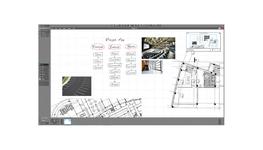
This powerful visual collaboration software allows users to create and capture ideas in the virtually unlimited interactive Unbound Workspace, as well as make notes over any available application, keep meetings organized and easily communicate outcomes.
Windows 10 support
SMART Meeting Pro is fully supported on Windows 10
Adobe PDF integration
Write in Adobe PDF files. All contributions are attributed to whoever wrote them. Remote participants can write in the files via SMART Bridgit software. You can also instantly import PDF files into the Meeting Pro workspace.
Radar View
Keep a maps-style overview of your content that shows your current location and content that is outside of your current view, as well as navigate to different areas of your workspace.
Organizer
Control which content appears on which screen to ensure you get the most out of your multi-display setup.
Enhanced Interaction Performance
Interacting with content is smoother and more natural and the software supports larger files than ever before in the Unbound Workspace.
SMART Bridgit conferencing software
A license to SMART Bridgit lets remote participants join meetings remotely and write over content in the workspace. It’s as if they’re in the room. A separate license is required for Bridgit.
Exchange and Office 365 integration
Merge your Microsoft Office calendar with SMART Meeting Pro meetings. Access attachments, the agenda and view the attendee list, as well as have the notes sent out automatically after the meeting if you wish.
Unified Communications Flexibility
When used with distance collaboration software like Bridgit conferencing software (as well as Microsoft Lync and WebEx) remote participants can contribute their notes and ideas.
Customizable Business Gallery
Build out customized Business Galleries using your company’s templates. Organize your custom galleries using custom folder names and export them for deployment and use with other SMART Meeting Pro installations throughout your organization.
Bookmarks
Insert bookmarks to easily navigate to content when referencing or presenting material.
Specification Details for SMART Meeting Pro (Office Desks)
Please note that these product properties are not a replacement for the manufacturer's literature and it is always recommended that Smart Presentations is consulted before specifying.
 Commercial
|
||
| Typical Building Sector (?) | Commercial | |
 Other
Other
|
||
| Uniclass (?) | Pr_40_50_21_59 Office desks | |
File Downloads for SMART Meeting Pro
Similar Office Desks Products

Contact

Contact
Contact